
How to Create a Credit Note in UniPhi
Updated: Mar 18
A credit note is used to adjust or reverse previously invoiced amounts within a contract. In UniPhi, this is done by entering negative values against deliverables or variations and then issuing the credit note through a document workflow.
Step-by-Step Instructions
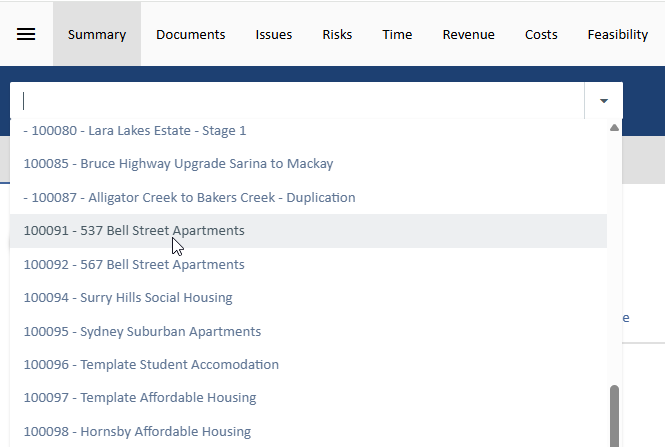
1. Select the Project
Choose the relevant project from the project dropdown where the credit note needs to be issued
2. Open the Contract
Go to the Contracts Module and select the relevant revenue contract associated with the invoice.

3. Access the Invoice Screen
Within the contract, navigate to the Invoice screen.

4. Enter Credit Amounts
Identify the deliverable(s) and/or variation(s) you want to credit
Enter a negative dollar value (-) against the relevant line items
Example: -£5,000 to reverse part of an invoice

Ensure the value reflects exactly what you intend to credit, as this will flow directly into the credit note document.
5. Save the Changes
Click Save to confirm the negative amounts.

6. Start the Credit Note Workflow
Click Start New Document Workflow

Select the Credit Note Template

7. Complete the Workflow Steps
Progress through each step of the credit note template.
Populate any required fields (Invoice Date, Due Date).

8. Finalise the Document
On the final step:
Rename the document as required (e.g. Credit Note – CN001 – March 2026)
Change the Document Status to “Awaiting Sign Off”

Key Notes
Credit notes are created by entering negative values, not by a separate “credit” function
Ensure the correct template is selected to maintain consistency with project workflows
Approval will follow the configured delegations and sign-off process.
Common Use Cases
Overbilling corrections
Scope reductions
Reversal of previously approved variations
Contract adjustments


Comments