
Configuring Team Member Charge and Cost Rates
Updated: Feb 25
Once your resource pool and classifications are set up, you must assign charge rates.
Methods for Managing Rates
UniPhi supports two primary methods for managing rates:
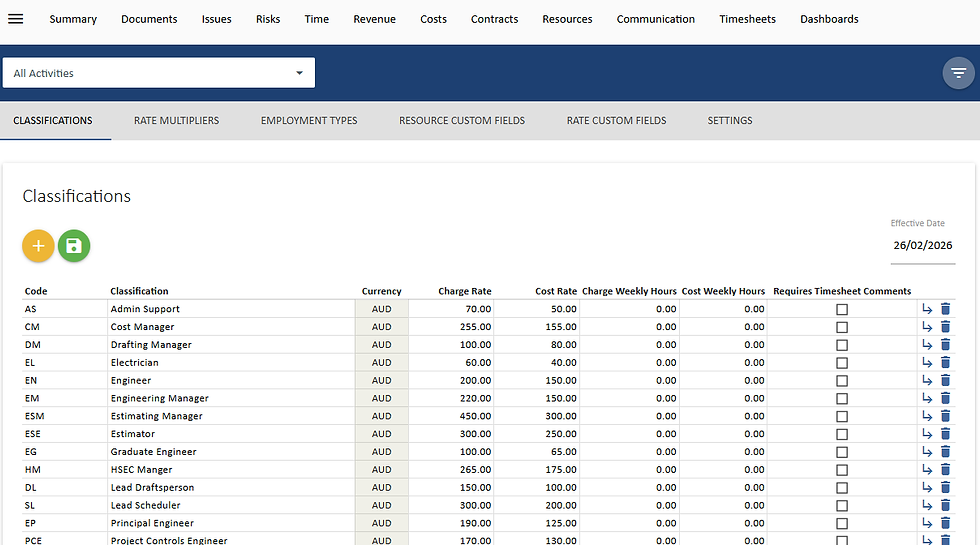
Rates by Classification (Most Common): You enter the rates and any escalation over time at the Resource Classification level. These rates then automatically cascade down to every person assigned to that classification.
Rates by Individual: You enter specific rates and escalation plans for each individual person under the Resource Profile > Rate History.

Key Rate Features
Effective Dates: Rates are managed using an effective date. This allows you to set future rate increases for long-running projects. When an invoice is calculated, UniPhi uses the rate that was effective on the date the time was actually recorded .
Effective dates can be set up under Configuration > Resources > Classifications.

Custom Rate Rules: UniPhi can be configured to handle complex contractual rate rules . If your contract has unique rules, they can be configured in the system. Examples include:
Location-Based Rates: Applying different rates depending on a person's location (e.g., "Local Office Full-Time" vs. "Sydney Metro Full-Time") .
Multiplier-Based Rates: Calculating the charge rate based on a person's salary times a multiplier (e.g., salary x 1.5).
Weekly Hour Limits: Capping billable hours for a resource (e.g., a person cannot bill more than 40 hours in a week) .


Comments